


TechPoint: On-Premise access control without
Cloud-based forced and without servers
TechPoint is an access controller that stores management, permissions, and bookings directly on the device. It is configured in a web browser and powered by PoE+. Up to 64 controllers can be networked without a server, and there are no annual license fees for operation.
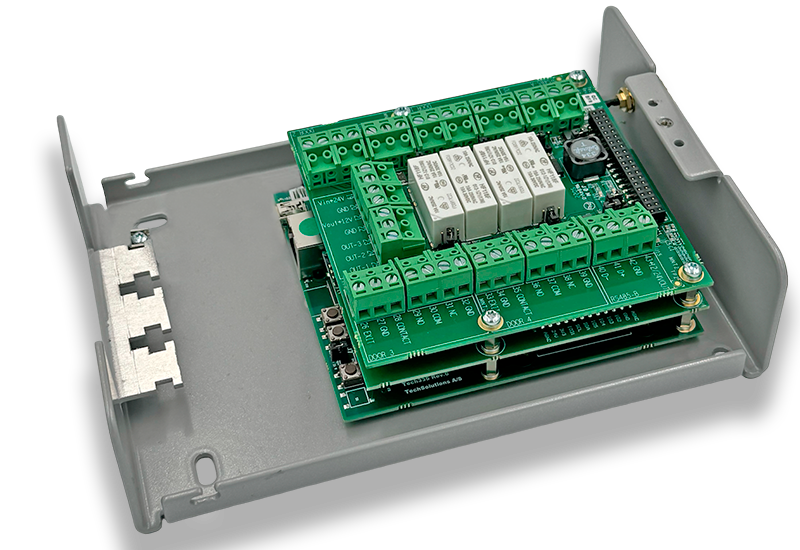
TechPoint at a glance
| 12 doors | per controller: 4 directly, 8 via OSDP I/O modules |
| 64 Controllers | Total number of connections: 1 master, 63 slaves, no servers |
| 500.000 | Passport holders |
| 1.500 | wireless offline doors, plus up to 16 online doors |
| since 2014 | In use, in more than 10 countries, 7th hardware generation |
| 0 € | annual license fee (cloud browsing is subject to license fees) |
Your access control remains in your building
Many access systems are now moving their intelligence to the cloud. That’s convenient – as long as everything works smoothly. If the provider goes out of business, changes their licensing model, or the contract ends, the security technology in your building suddenly becomes unavailable.
TechPoint takes the opposite approach. All access management is integrated into the controller: the database, configuration interface, and authorization logic run on the device itself. You don’t need a server in the rack, PC software on a workstation, or a cloud subscription.
This brings three things to mind that are important in the workplace:
- Data sovereignty. Personal access data does not leave your network. This significantly simplifies the data protection review, as no third-party processor or third-party transfer is involved.
- No ongoing license costs. You pay for the hardware, not the permission to use it.
- Independence from the Internet connection. Access works when the line fails – more on that later.
Cloud functionality does not rule that out. Anyone who wants remote access, app usage, or notifications can turn them on. The difference is that they remain an addition and are not a prerequisite for the doors to work.
Access control that can be managed effortlessly
Permissions change daily: A new employee starts, a service provider needs temporary access, a department moves. With the TechPoint Access Controller, you can adjust access rights for individual rooms, areas, or time windows in just a few steps – and always keep track of who is allowed to move where.
The result: less administrative effort for your facility management, clear responsibilities, and a security level that continuously adapts to your organization instead of the other way around.
Master-slave topology: what happens in the event of a failure
Each TechPoint stores permissions and bookings itself. Several controllers work as a master-slave combination: The master manages the permissions centrally, each slave controls its doors with its own permission data. Up to 63 slaves are attached to a master; a higher-level server is not necessary.
Network failure
The Slaves continue to operate with their local permissions. Bookings are transferred to the Master after restoration.
Master's failure
The doors remain functional. A replacement device (Cold Standby) takes over, or a slave is redefined as the master. This takes about five minutes.
Power supply
TechPoint is powered via PoE+ or an external power supply. The power supply can be secured via a UPS.
Event storage
Each controller stores up to 1,000,000 events locally. The oldest entries are overwritten.
Several buildings
Each building gets its own master-slave group.
On-Premise, Cloud or Server: the comparison
Access control can be operated in three ways. The difference lies in where the data and administration are located and what happens in the event of a disruption.
| Criteria | TechPoint (On-Premise in the controller) | Cloud access control | Classic with a server |
|---|---|---|---|
| Where are permissions and bookings located? | In the controller, in the building | With the provider in the cloud | On a server at the customer's premises |
| Do you need the Internet for operation? | No | For the administration, yes | No |
| Do you need servers and PC software? | No | No | Yes: Servers, software, database |
| Ongoing costs | No annual license fee; API connection is subject to license | Most often a subscription per door or user | Often software licenses and maintenance contracts |
| In the event of a network failure | Slaves continue to work with local permissions | Depending on the manufacturer | Controllers mostly autonomous; central administration falls away |
| Remote access | Optionally via TechPoint Cloud and App | Core function | Via VPN or client software |
| Data protection | Data remain in the building | Usually a contract for order processing with the provider | Data with the customer |
The information about cloud and server systems describes typical characteristics; individual manufacturers deviate from these.
Integrations
TechPoint relies on open protocols and uses readers, wireless locks, and existing security technology.
Readers
Readers are connected via OSDP via RS485, up to 8 per door; typically 1 to 2. Suitable readID readers from Security Engineering can be found under Readers & Peripherals.
Wireless doors with SimonsVoss SmartIntego
TechPoint manages up to 16 wireless online doors and up to 1,500 offline doors. For wireless doors, we work with SimonsVoss SmartIntego, which can be fully integrated into TechPoint.

Burglar alarm system and video surveillance
TechPoint integrates with burglar alarm and video surveillance systems. Alarms can be transmitted to control centers via the SIA DC-09 system.
IT systems via the API
Room booking, building management or parking systems are connected via the TechPoint API. The API connection is subject to a license fee.
Options
TechPoint Cloud and App for remote access as well as 4G mobile telephony for alarms via SMS and email are available as optional extras.
Investment protection instead of throw-away technology
Access control is an infrastructure decision. It is planned, wired, put into operation – and then it is supposed to run for years. That is exactly what TechPoint is designed for: the system accompanies technological development, rather than making it an occasion for a complete overhaul.
This keeps the value of your investment in access control. You expand as your building grows and modernize gradually, rather than starting from scratch every few years.
Long-term viability also depends on who owns the system. Since TechPoint operates without license and subscription fees, an installed system remains operational regardless of future pricing models. This is not a given with cloud-based systems: In these cases, the functionality of the hardware ends with the contract.
For builders and planners
We support security technology developers and planners from system design to tender.
Downloads
Partner program for builders
- Planning support for your projects
- Earlier access to new features
- Participation in product ideas
- Listing as TechPoint partner
Product webinar
Next date: 30.11.2026, 10:00 a.m.
Registration at:
Manufacturer and contact person
TechPoint is developed by TechSolutions and is currently in the 7th hardware generation. Sales and planning support in Germany, Austria and Switzerland: TechSolutions Germany GmbH in Furtwangen.
References and applications
TechPoint has been deployed in more than 10 countries since 2014: in office buildings, industrial buildings, public buildings and residential buildings.
Technical data
| Doors | Cabled | 4 doors directly, plus 8 doors via OSDP-I/O modules (SE 600-0 or TPA-IO1) |
| Doors | Wireless | up to 16 online doors, up to 1,500 offline doors |
| Readers | Annexation | OSDP via RS485, up to 8 readers per door (usually 1–2) |
| Capacity | Passport holders | up to 500,000 |
| Capacity | Event storage | 1.000.000 |
| Capacity | Timetables | 1.000 |
| Networking | Master-Slave | up to 64 controllers per bundle (1 master, 63 slaves) |
| Inputs and outputs | Surveillance entrances | 6, 2/3/4-state monitoring, analog or digital, max. 40 V DC |
| Inputs and outputs | Digital inputs | 2 (5 V DC) |
| Inputs and outputs | Relais | 4 (NO, NC, C), 10 A at 250 V AC / 30 V DC |
| Inputs and outputs | Open-drain outputs | 3, max. 750 mA |
| Supply | Entrance | PoE+ (IEEE 802.3at), PoE (IEEE 802.3af) or 14–30 V DC |
| Supply | Power consumption | Typical 1.4 W, max. 1.9 W |
| Supply | Outputs for peripherals | 12 V DC, max. 1,800 mA; with PoE 24 V DC, max. 900 mA |
| Network | Security | IEEE 802.1X, TLS 1.3, HTTPS, IP address filtering, password-protected user levels |
| Network | Protocols | IPv4, IPv6, HTTP, HTTPS, SFTP, SMTP, SNMP, DNS, SNTP |
| Network | Alarm transmission | SIA DC-09 |
| Hardware | Processor and memory | ARM Cortex-A8, 128 MB RAM, 8 GB Flash, microSD slot |
| Hardware | Dimensions | 210 × 140 × 50 mm (H × W × T) |
| Hardware | Weight | 0.65 kg |
| Hardware | Housing | Aluminium, RAL 9002 and RAL 9006, optical sabotage contact |
| Hardware | Assembly | Wall mounting, bracket optional |
| Surroundings | Operating temperature | 0 to 50 °C, 20–80 % relative humidity, non-condensing |
| Surroundings | Protection class | IP20 |
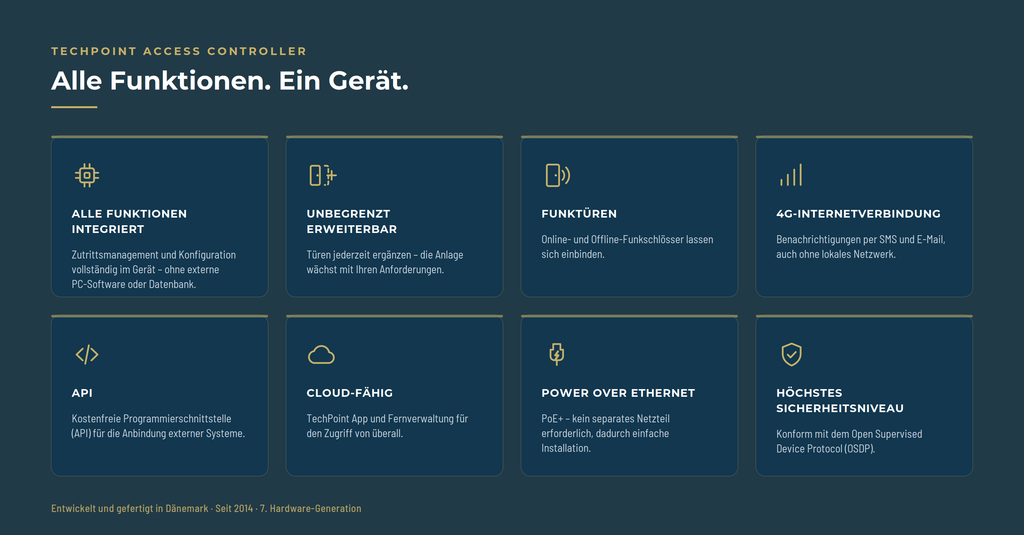
Frequently asked questions about TechPoint
Answers to the questions that developers, planners and operators most frequently ask.
Which buildings are suitable for TechPoint?
For organizations that want to control access in a structured way: from offices to industry to public facilities and residential buildings. An installation grows from one door to 64 connected controllers.
Does TechPoint work without the cloud?
Yes. Administration and the database are located in the controller. Cloud features such as remote access and apps are optional.
Is a server or PC software required?
No. TechPoint is set up and managed via the integrated interface in the web browser.
Are there any ongoing license fees?
Not for operation; there is no license or subscription model. Only the connection to external systems via the API for cloud browsing and the app is subject to a license fee.
How many doors does a TechPoint control?
4 doors directly and 8 more via OSDP-I/O modules, that is 12 wired doors per controller. In addition, there are up to 16 wireless online doors and up to 1,500 offline doors.
How many controllers can be connected together?
Up to 64 in a cluster: 1 master and 63 slaves. Larger systems are divided into several groups.
Will access control work in the event of a network failure?
Yes. The slaves continue to work with their local permissions; bookings are transferred after the restore.
What happens if the master fails?
The doors remain functional. A replacement device takes over or a slave is redefined as the master; this takes about five minutes.
How many access events does TechPoint store?
Up to 1,000,000 per controller. The oldest entries are overwritten.
Which readers can I connect to?
All OSDP readers via RS485, up to 8 per door. We recommend the readID readers from Security Engineering.
Can wireless locks be integrated?
Yes. For wireless online and offline doors, we work with SimonsVoss SmartIntego, which can be fully integrated into TechPoint.
How is TechPoint supplied with electricity?
Via PoE+ or PoE over the network cable, or with 14–30 V DC. The power supply can be secured via a UPS.
What security standards does TechPoint support?
OSDP for reader connectivity, TLS 1.3 and HTTPS for encrypted communication, IEEE 802.1X for network access control, and SIA DC-09 for alarm transmission.
Are there tender documents?
Yes, feel free to contact us about that.
Who creates TechPoint?
TechPoint is developed by TechSolutions and has been in use since 2014. Sales and planning support in Germany, Austria and Switzerland is provided by TechSolutions Germany GmbH in Furtwangen.
How do I become a TechPoint partner?
Through the contact form or by email to info@techsolutions.de. Partners receive planning support, early access to new features, and are listed as TechPoint partners.
Talk to us about your access concept
Please describe your project: building, approximate number of doors and existing security technology. We will get back to you with a proposal for the system design.